


TabTrader: Crypto Terminal
3.81.17K Reviews
App Specs
- Version
- 7.5.7
- Updated On
- License
- Free
- Downloads
- 1,000,000+
- Developer
- Tabtrader Acquisition Corp
- Categories
- Finance
- Platform
- Android
Screenshots
 Analysis by AppCompare
Before I connect anything or place a trade, I want a clear idea of what a crypto terminal can—and cannot—do for me. TabTrader: Crypto Terminal is a finance app for keeping market charts and trading activity together on a phone. Its appeal is less about teaching the basics of cryptocurrency and more about reducing the need to switch between separate exchange apps when checking prices or managing trades. If you are new, that can make a busy market feel more organized, but it does not remove the need to understand orders, fees, or the risks of a sudden price move.
What to expect from a mobile trading terminal
The first adjustment is mental: this is a workspace, not a promise of better returns. I would use it to follow markets, compare price movement, and keep an eye on an exchange account, while making my own decisions about whether a trade is worthwhile. A chart can help me notice a pattern or set a level to watch, but it cannot tell me whether that pattern will continue. That distinction matters especially when a screen makes rapid action feel easy.
The app is free to install, with in-app purchases available, and its age rating is Everyone. TabTrader Acquisition Corp is the developer. It has an average rating of 3.8 from around 65,000 ratings, and more than a million installs. Those figures suggest a substantial audience, but I would treat a rating as a rough signal rather than proof that every exchange connection or workflow will suit my needs. The app’s current version is 7.5.7, and it runs on Android 6.0 or later.
For a first-time user, the practical question is whether you already have a preferred crypto exchange account. A terminal can bring access and monitoring into one place, but it is not a substitute for choosing an exchange carefully or learning how that exchange handles deposits, withdrawals, and order types. If you only want to check a coin’s headline price now and then, a simple price-tracking app may be less demanding. If you regularly compare markets or manage activity across accounts, a dedicated terminal is easier to justify.
Make the first setup deliberate
I would begin by opening the app and exploring its market and chart views before connecting an exchange. That gives me a chance to learn where search, watchlists, and chart controls live without putting account access or a live order into the first few minutes. The exact layout can take a little getting used to, so it is worth slowing down and identifying which screen shows the market I actually mean to follow.
When you do connect an exchange, pause to read the permissions requested and use only the access needed for your intended workflow. An account connection is not the same thing as a guarantee of safety, and a trading app cannot eliminate the risks that come with credentials or careless order entry. I would also secure the exchange account itself with its available protections and avoid making a first trade just to test whether a button works.
A useful setup is a small, focused watchlist rather than a long catalogue of coins. Add only the markets you genuinely intend to monitor, then choose a few price levels that would make you investigate further. This keeps alerts meaningful. If every small move generates a notification, I am more likely to dismiss them all; a short list helps the app serve as a reminder instead of becoming another source of noise.
Worth Reading Before You Choose

EA SPORTS FC Mobile 26 Is a Bigger Football Game, but It Takes Time

Flipboard Shows What News Apps Must Do Beyond the Feed

Switching to Android Auto Means Rethinking Your Driving Routine

Google Calendar Makes a Crowded Week Easier to Manage

Ludo King Makes the Most of the Minutes Between Plans

Baby Panda World Brings Quick Play to Modern Phones, but Its Game Library Feels Busy
Turn a chart into a first useful action
My first meaningful success would not be a profitable trade. It would be setting up a market view I can understand, then using an alert to tell me when a price reaches a level I chose in advance. That workflow gives me a reason to check the app without staring at it constantly. When an alert arrives, I can review the chart and decide whether anything has changed, rather than treating the notification as an instruction to buy or sell.
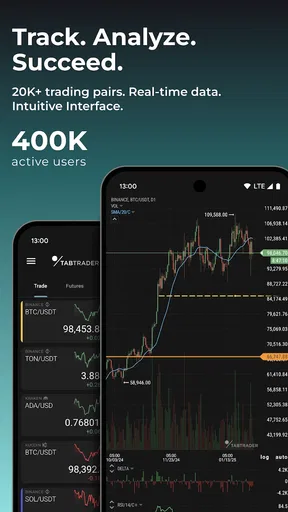
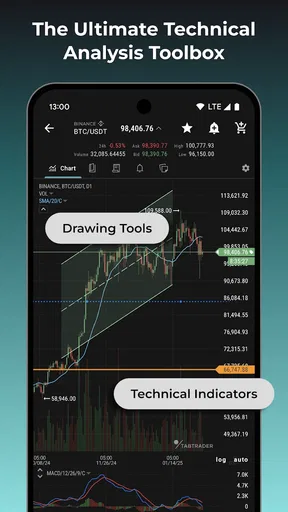
Charts and indicators are most useful when I know what question I am asking. For example, I might compare a market’s recent movement with a level I have already marked, rather than adding indicators simply because they are available. Too many overlays can make a chart harder to read, particularly on a phone. I would start with a simple view, learn what each tool is showing, and only add detail when it helps answer a specific question.
For an everyday routine, imagine checking prices during a commute, then leaving an alert to tell you when a chosen market reaches a point worth reviewing. Later, you can open the chart, check which exchange account is relevant, and decide whether to take any action. That is a calmer use of a trading terminal than reacting to every movement. It also makes clear that an alert is a prompt to review, not a prediction or an automatic safeguard against loss.
All-in-One Trading Hub
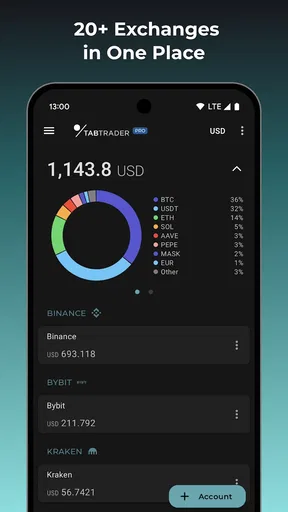
The first thing that struck me about TabTrader: Crypto Terminal is its all-in-one approach. Imagine having access to over 20 different exchanges, like Binance, Coinbase Pro, and Kraken, all from a single interface. It’s like having a universal remote for your crypto investments. The app seamlessly integrates with these platforms, allowing you to track your portfolio, execute trades, and even set alerts for price changes. It’s a bit like having a personal trading assistant tucked in your pocket.
User Interface and Experience
You know how some apps feel like a maze? That’s not the case here. TabTrader is designed with user-friendliness in mind. The interface is clean, intuitive, and doesn’t overwhelm you with unnecessary clutter. You’ll find easy navigation between different sections, which is a big plus if you’re new to crypto trading or just appreciate a streamlined experience. I particularly enjoyed the charting tools that come with a variety of indicators. Whether you’re a seasoned trader or a newbie, you’ll find these tools both powerful and accessible.
Features That Make a Difference
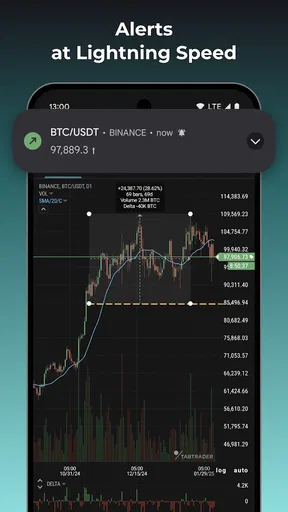
Alright, let’s talk features. One standout is the alert system. You can set specific price alerts and get notified immediately when your target is hit. This ensures you never miss a beat in the fast-paced world of crypto trading. Another cool feature is the ability to execute trades directly from the app across multiple exchanges. This saves a ton of time and effort, especially if you’re juggling several portfolios. The security measures are also commendable, with options for two-factor authentication to keep your investments safe.
Performance and Reliability
Nobody likes an app that lags, particularly when you’re trying to make a quick trade. I found TabTrader to be impressively responsive. The app loads quickly, and the real-time data updates without a hitch. I haven’t encountered any crashes or bugs, which is a relief, especially when dealing with real money transactions. It’s clear that the developers have prioritized stability, which, in my book, is a must for any trading app.
Customization and Personalization
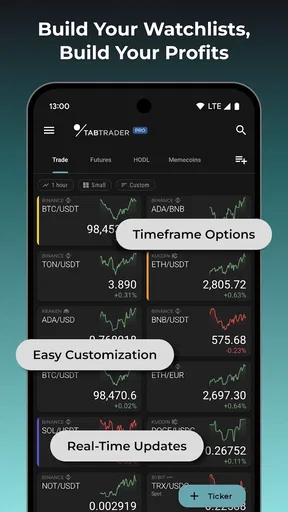
One of the things I love about TabTrader is the level of customization it offers. You can tailor the app to fit your trading style. Whether it’s adjusting the interface layout, setting your preferred chart types, or organizing your watchlists, the app lets you make it your own. This personalization aspect enhances the overall user experience, making it more than just a generic trading terminal.
Community and Support
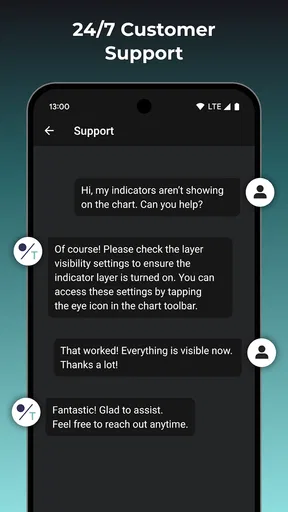
Last but not least, let’s talk support. TabTrader has a pretty active community of users who are more than willing to share tips and tricks. The support team is also responsive, addressing any issues or queries you might have. It’s comforting to know that if you run into any snags, help is just a message away.
Where the convenience has limits
Putting several markets and accounts in one interface can save time, but it also creates a new responsibility: checking that each screen is showing the exchange and trading pair I intend to use. Similar-looking symbols or quote currencies can lead to a mistaken comparison. Before acting, I would confirm the market, the direction of the order, and the exchange shown in the trade flow. That small pause is more valuable than shaving a few seconds off an order.
There is also a meaningful difference between watching an asset and being ready to trade it. A chart view may be convenient, while the exchange remains the place that determines the account balance and order outcome. I would not assume that a price visible in one view guarantees an identical execution elsewhere; markets can move, and exchange conditions can differ. For a decision that depends on a precise fill, checking the relevant exchange details is sensible.
Compared with opening each exchange’s own app, a multi-exchange terminal can make scanning and chart work less fragmented. The trade-off is that an exchange’s native app may be clearer for account-specific tasks and its own order controls. Compared with a basic coin tracker, TabTrader is aimed at a more active workflow: charts, alerts, and trading access matter more than a simple glance at a price. I would choose the lighter tracker if I only needed occasional checks, and the exchange app if I rarely use more than one platform and want to keep everything within that service.
One practical way to avoid notification fatigue is to treat alerts as checkpoints. Set a level because you have a reason to review it, not because every round number seems important. If a market becomes more volatile, reassess whether the alert still fits your plan rather than accumulating new ones. This turns the feature into a small part of a routine: choose a level, wait, inspect the chart when prompted, and decide independently.
Who will get the most from it
I can see the strongest fit for someone who already follows crypto markets and wants a consolidated mobile workspace, especially if they compare more than one exchange or use charts and price alerts as part of a regular process. It can also help a newer trader who is willing to learn gradually: first browse markets, then build a modest watchlist, then connect an account when comfortable. The order matters. Starting with observation reduces the chance of confusing familiarity with readiness to trade.
I would steer away from it if you are looking for personal financial advice, guaranteed signals, or a hands-off way to make money. It is also not necessarily the best choice if you find charts stressful or tend to act impulsively when prices move. In that case, a plain watchlist—or simply checking an exchange less often—may support better decisions. A feature-rich terminal is only useful when its extra information helps you stay deliberate rather than encouraging more frequent trading.
The app is free, but in-app purchases range from $2.99 to $109.99 per item. I would first work out whether the core workflow meets my needs before paying for anything. A purchase only makes sense if it addresses a specific limitation in how I use the app; it is not a shortcut to sound trading decisions. That is a useful distinction for beginners, who can otherwise mistake a paid option for something essential to getting started.
Another sensible habit is to review the watchlist and connected accounts occasionally. Remove markets you no longer follow, and make sure the exchange selected for an action is the one you meant to use. This is not glamorous, but it prevents a cluttered workspace from quietly undermining the convenience that drew you to a multi-exchange tool in the first place.
To wrap it up, TabTrader: Crypto Terminal is a robust, user-friendly app that brings a lot to the table for crypto traders. It’s packed with features that cater to both beginners and pros alike, and its performance is top-notch. If you’re looking for a reliable way to manage your crypto investments on the go, this app is definitely worth a look. Happy trading!
My next step after installing
If I were guiding a friend through the first session, I would keep the goal small: find a market, learn the chart controls, save a short watchlist, and set one useful alert. Then I would close the app and wait for a reason to return. Once that routine feels clear, I would explore account connections and trading actions carefully, checking each screen before confirming anything. This gradual path is less exciting than jumping straight into a trade, but it is a much better way to learn what the terminal actually does.
Overall, my recommendation depends on how you approach crypto. If you like having charting, alerts, and multiple exchange workflows close at hand, this is a capable place to organize that activity. If you want a simple price glance or prefer to keep every action inside one exchange’s own app, another option may feel more straightforward. I would install it for market organization, not as a substitute for judgment—and I would let a first successful alert, rather than a first trade, be the milestone that makes the app useful.
Pros
- User-friendly interface for quick access.
- Supports multiple exchanges in one app.
- Real-time alerts for price changes.
- Customizable charts and indicators.
- Secure API integration with exchanges.
Cons
- Limited support for smaller exchanges.
- No desktop version available.
- Occasional lag during high traffic.
- Some features require premium version.
- Learning curve for crypto beginners.
FAQs for TabTrader: Crypto Terminal
What is TabTrader: Crypto Terminal and how does it work?
TabTrader: Crypto Terminal is a mobile trading platform that allows users to manage their cryptocurrency investments across multiple exchanges from a single interface. It provides real-time market data, charts, and trading capabilities, enabling seamless transactions and portfolio management. Users can track over 30 exchanges, set alerts, and execute trades directly from the app.
Is TabTrader: Crypto Terminal free to use?
Yes, TabTrader is free to download and use, offering a range of features without cost. However, it does have premium options available for users who require additional features such as advanced analytics, more alerts, and ad-free experiences. The free version is sufficient for the average trader to manage their portfolios effectively.
Which exchanges are supported by TabTrader?
TabTrader supports over 30 major cryptocurrency exchanges, including Binance, Bitfinex, Bittrex, and Coinbase Pro. This extensive compatibility allows users to manage a diverse range of assets without needing to switch between different exchange apps, streamlining the trading process and enhancing efficiency.
How secure is TabTrader: Crypto Terminal for managing my crypto assets?
TabTrader prioritizes user security by not storing user funds or private keys on its servers. Instead, it connects directly to exchanges via API keys, which are stored locally on your device. This decentralized approach minimizes the risk of unauthorized access. Additionally, the app supports two-factor authentication to further enhance security.
Can I use TabTrader: Crypto Terminal for technical analysis?
Yes, TabTrader offers a variety of technical analysis tools to assist traders in making informed decisions. It includes interactive charts, customizable indicators, and drawing tools. These features allow traders to conduct in-depth analysis of market trends and price movements, helping them to optimize their trading strategies.


